
GC Forms is designed to hold responses temporarily, ensuring a prompt transfer of data to program or service owners. The limited data retention period is intended to mitigate security risks and protect end user’s data.
As outlined in the GC Forms terms of use, it is the department program or service’s responsibility to retrieve all responses from GC Forms within 45 days of receiving each of these.
Stay on top of response retrieval:
Sign in to your GC Forms account at least once a week to download and confirm all new form responses.
If responses are not downloaded and confirmed (signed off for removal) in a timely manner, there are a series of reminders that will nudge clients to fulfill their responsibilities and get all responses from the system.
Escalation path for overdue responses:
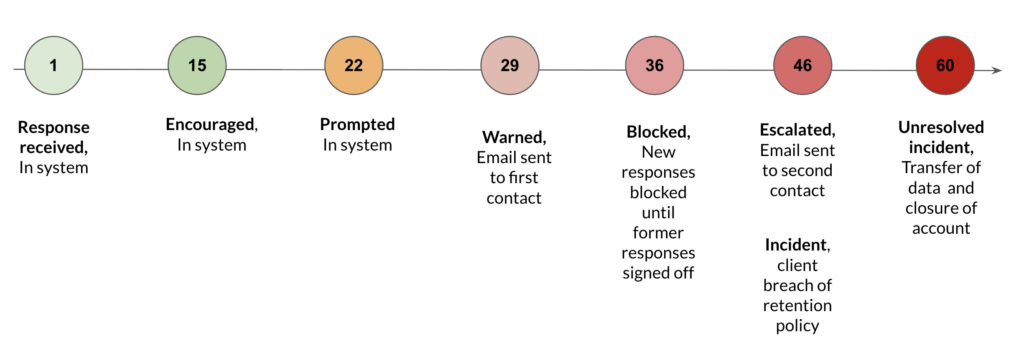
A failure to follow the terms of use with regards to having form response data in GC Forms for more than 30 days may lead to account restrictions. This may include a restricted ability to access new responses until overdue responses are retrieved, and, in some cases, an incident process that involves the transfer of data to service owner or departmental ATIP (Access to Information and Privacy) team, and the deactivation or closure of the account.
Account restrictions and overdue response timeline:
- Day 1: Response arrives.
- Day 1 – 14: Normal response retrieval timeline.
- Day 15 – 21: Signal in the response table which ones are overdue.
- Day 22 – 28: A banner appears at the top of the responses page informing you that have responses awaiting retrieval.
- Day 29 – 35: We begin emailing you to let you know you need to download and confirm responses.
- Day 36 – 45: We restrict downloading new responses until the old ones are downloaded and signed off for removal.
- Day 60+: We may deem the account to be inactive and explore options to send your data to your designated service owner (manager) or departmental ATIP team.


